You can group your galleries into collections, which act as galleries of galleries. When you click a gallery thumbnail inside a collection, it opens that specific gallery. You can then navigate back to the main collection view to browse the others.
Layouts
Menu
The Menu layout displays the first gallery by default and adds a header menu bar that your users can use to choose between the different galleries manually.
Bento
The Bento layout creates different boxes, one for each gallery inside the collection. You can click any card to open the related gallery.
Photo Engine (Lightroom Collections)
You can create collections directly from your WP/LR hierarchy without having to manually build galleries.
Simply copy and paste the shortcode provided by Photo Engine, and each collection in your folder structure will automatically become a gallery inside a Meow Collection.
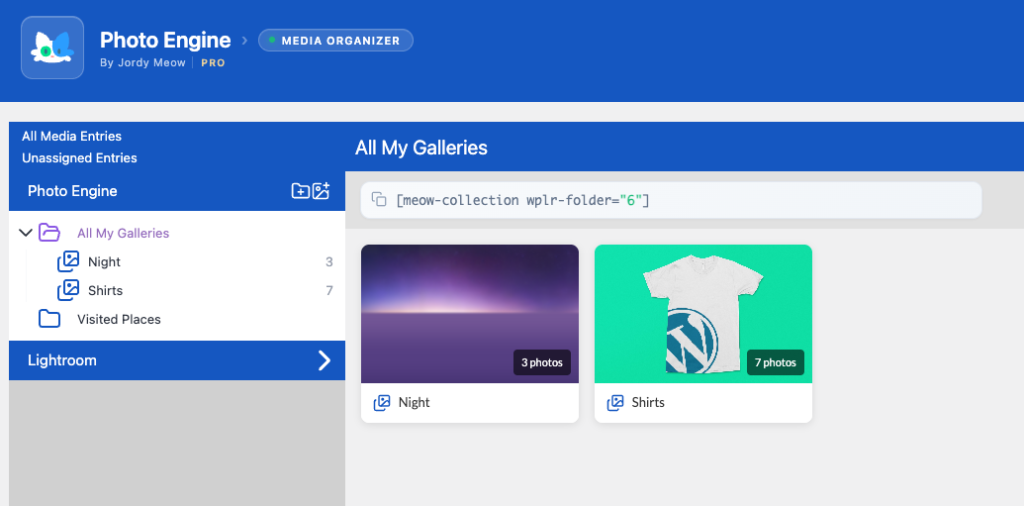
Each collection is rendered as a gallery using your default gallery settings.
If you want to customize the galleries inside a Meow Collection directly through the shortcode, you can use any gallery shortcode attribute by prefixing it with gallery_.
For example, if a normal gallery would use:
[gallery layout="square"]Then for a Meow Collection you would use:
[meow-collection wplr-folder="6" gallery_layout="square"]This will apply the square layout to all galleries inside the collection.